


Superbuy Spreadsheet
First edition ·
A collection that keeps moving forward — new finds added regularly, product information refreshed and broken links cleared along the way.
- Checked product links
- Factory photo galleries
- Catalogue updates
- Quick category browsing
Why choose superbuy-bestsheet.com?
Narrow your search with 20 categories
Shoes, jackets and belts each have a dedicated category. Browse similar items together, or enter a brand and model in the search box to go straight to the listings that match.
Compare the styles in one picture
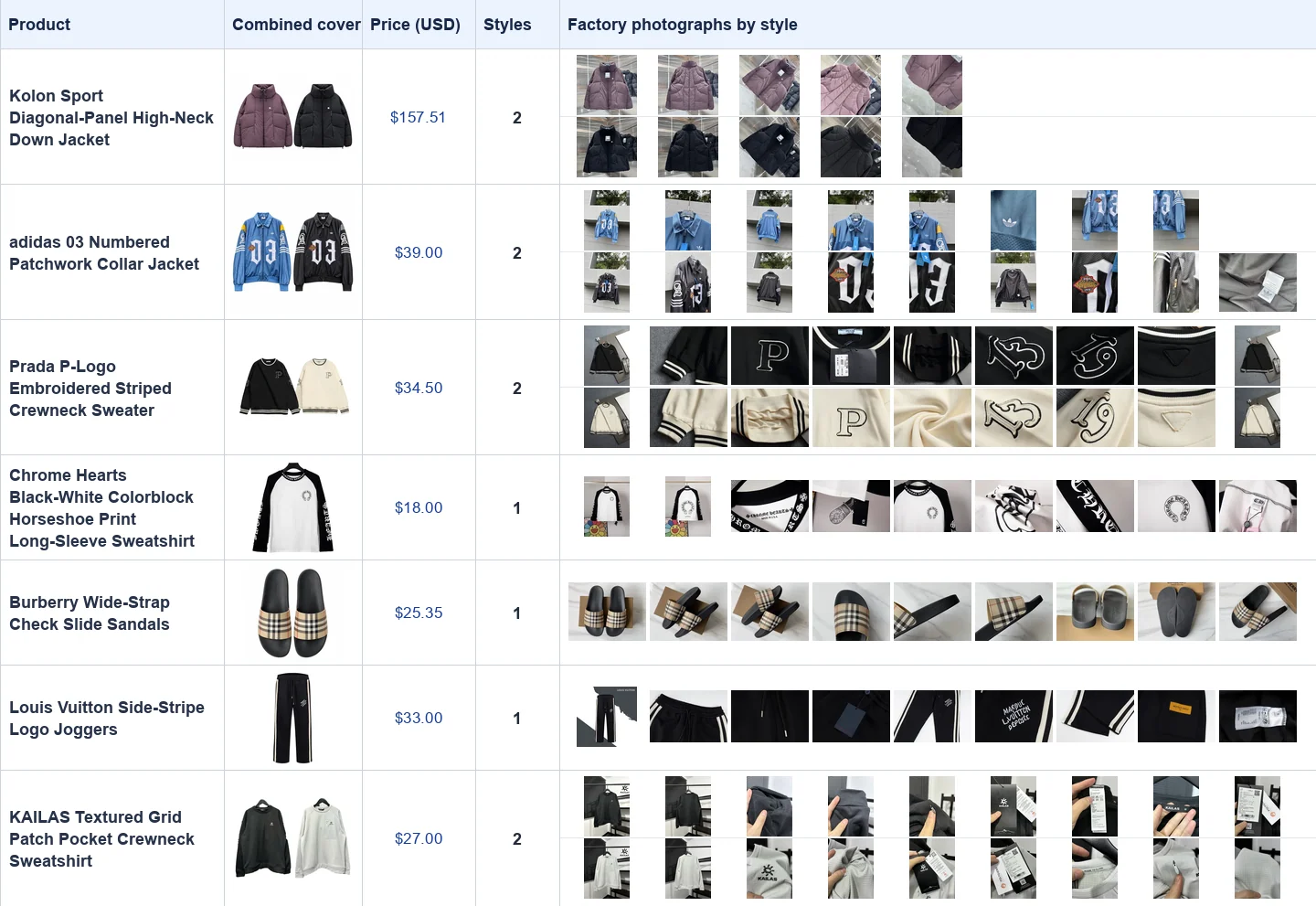
On the striped P-logo crewneck, the black and apricot versions appear side by side. You can see how the cuff stripes change with the body colour, then open the individual images for the version you prefer.
See the details in factory photos
Selected popular listings include factory photos as well as the main image. On outerwear, use the front and detail views to check the collar shape and panel seams before choosing an option on Superbuy.
Turn a product link into a well-specified order
A product URL identifies a listing, but it can leave the most important choices open. Which belt length did you measure? Which connector fits the phone? Which jersey back did you choose? This independent Superbuy spreadsheet pairs visual browsing with the short checks that make a seller order specific.
In Belts, compare buckle-pin-to-hole length with a belt that fits your trousers. In Eyewear, distinguish lens width, bridge and temple length. Write the endpoints along with the number. If a seller uses a different method, you can ask one precise question instead of requesting a general recommendation.
We add new finds, refresh product information and check shopping links as we maintain this collection.
Seven examples from the catalogue
Read across a row to compare the combined cover, listed USD price and number of styles. Each strip on the right shows photographs from one style’s gallery.
What is Superbuy?
superbuy-bestsheet.com is an independent product catalogue. You place your order on Superbuy.
What the shopping agent does
Superbuy’s shopping-agent guide describes buying from Chinese sellers on behalf of an overseas customer. You pick the seller’s item and options, and the purchase is received at the warehouse. Its official freight calculator is a separate tool for estimating the later international journey.
Inspecting an individual stored item
Arrival photos connect a warehouse item to the purchase you made. Use the selected size, label and one identifying feature to check it. When a number is unclear, specify the two measurement points in an enquiry so that the answer is comparable with your own garment.
Planning the international leg
Superbuy’s freight calculator is designed for a parcel and destination. Estimate using plausible packed weight and dimensions, then review the options presented for the actual parcel. A clothing-only estimate may be a poor match for a box containing footwear or electronics.
Superbuy shopping agent guide · Superbuy shipping calculator
How to shop with Superbuy
Confirm the seller’s specification
Use the Superbuy button on the chosen item. Read the seller’s size, colour and quantity, and confirm any note attached to the option. Keep the seller price and domestic delivery shown at purchase.
How Superbuy fits into the purchase
Superbuy’s official shopping-agent guide starts from choosing the item, submitting the order and having the agent purchase it. Our product link takes you to that agent workflow. Confirm the seller option, quantity, domestic delivery and any requested services there. If you already have a separate seller URL, use the official guide for the supported ways to submit it.
Inspect the identified warehouse item
Open the arrival details for your item. Check left and right on footwear, or compare a garment label with the order. If the picture cannot settle a measurement, request the specific endpoints before dispatch.
Check the received item in the right order
Begin with identity: item, version, colour and size. Next look at whichever detail motivated the purchase, whether it was a watch dial or the shape of a shoe collar. Finally account for the pieces and accessories included in the selected option. Keep any clarification attached to the order rather than trying to reconstruct it from a collection thumbnail.
Estimate and submit the parcel
Define the contents, destination and packaging first. Use Superbuy’s freight calculator for an initial comparison, then check the services offered on the submitted parcel. Retain the tracking number and the list of items it contains.
Estimate shipping after defining the parcel
Superbuy publishes a shipping calculator. Use it with a destination and the actual or estimated package dimensions and weight. A light but bulky item can change the options you see. Compare again after you know what is in the parcel and which packaging you intend to keep. The calculator is a planning aid for that specific combination.
Frequently asked questions
Where do I pay for the item I found here?
Use the Superbuy product link and review the order on Superbuy. This catalogue provides the comparison and item reference.
Which size do I enter if two charts disagree?
Check which chart applies to the seller option you have selected. Compare it with a garment measured the same way and resolve conflicting figures before submitting.
Can I use a clothing parcel quote for a watch or headphones?
Run a separate estimate for the actual items, packaging and destination. Check route eligibility when an item contains a battery or has a special handling requirement.
Which shoe measurement should I request?
Specify whether you need a removable insole length or the internal length, and name the size. A measurement of the outsole serves a different purpose.
When is the freight calculator most informative?
When the parcel dimensions, packed weight, contents and destination are already reasonably close to the combination you plan to submit.
How can I keep a follow-up measurement comparable?
Describe the starting point, endpoint and whether the item is laid flat. Keep the original measurement and the requested photo in the same order enquiry.